Google is probably robbing your website of local traffic. If you have seen your Google analytics data showing a decline in your website traffic, this might explain why.

Please Wait a Moment

Local SEO, Web Design & Digital Marketing Services

  • Serving Dayton Ohio and Surrounding Areas
  • Contact Us
FREE ESTIMATE
Loading
  • Questions and Comments Welcome. 

Digital Marketing Ad Campaign Dayton OhioLocal SEO, Dayton Ohio

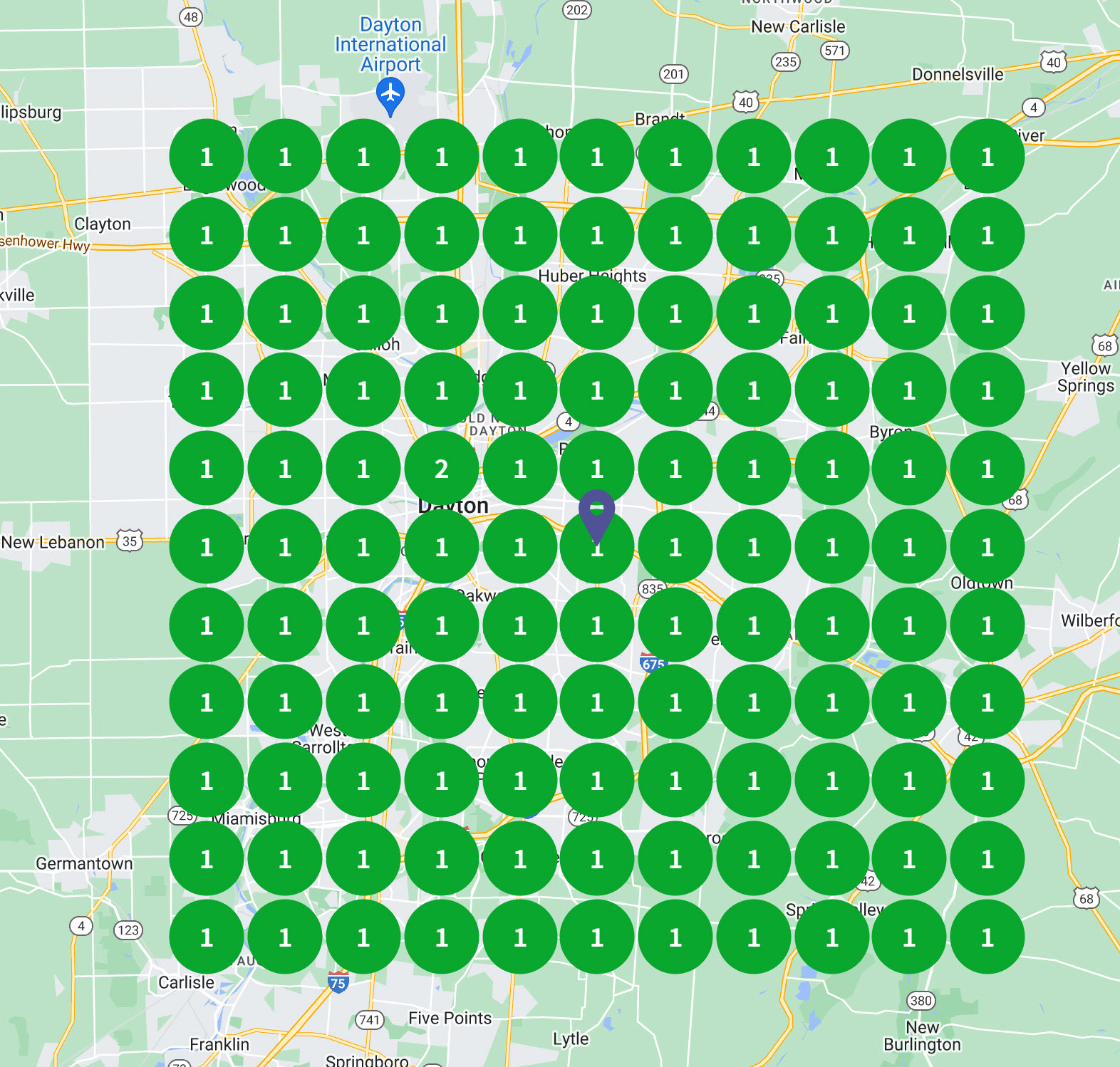
Every small local business knows this one thing! The top guy in the Google Maps section of Google search is getting the most business! The image here is a Google Maps ranking report for the term Local SEO. Every dot represents a search from that particular location. A green dot means you are showing up in the top three of Google MAPS which is an absolute requirement for small local businesses who want to dominate their local market. This grid ranking report is for 50Bubbles. We are dominant in the entire Miami Valley for searches related to "Local SEO". If you want the same results for your business, you are in the right place!

Is Your Website Traffic Declining? Google May Be The Reason

in Optimizing Google Business Listings Google Reviews
image

So you've taken a look at your Google Analytics website traffic and it has flat-lined or worse, it has actually started to dive. You're year over year results are showing that you had more traffic last year than you did this year. This might not all be bad news but you'll need to look beyond Google Analytics to figure out what is happening.

There is a little bit of an issue with being able to determine exactly what is happening - you don't have easy access to the data. So let me start with the premise and then show you how it plays out. Your TOTAL traffic may not actually be caving. Your total traffic is the traffic you get on your website PLUS the traffic that you get on your Google Business Listing.

Your viewable Google Business Listings insights data goes back as far as three months but that is not enough to show you what is happening or what has happened relative to your total traffic. By accessing the Google API Data for Google Business Listings however, we are able to go back 18 months. Here is an example of what happened to almost every account we were optimizing over the last 18 months...

Your Google MAPS listing probably saw a similar up-tick in August of last year. This data is from Google Business Listings - not Google Analytics. Your own Google Business Listing is very likely robbing your website of traffic!

It has been abundantly evident over the past couple of years that Google is shifting the search focus to mobile. Beyond forcing most website owners to consider updating their website to be mobile friendly (responsive), Google is also making search itself more mobile friendly. One of the biggest changes is the updates they have added to Google Business Listings. If you have not visited your Google My Business page and edited your business information, there is no time like the present!

Here's what you need to be updating:

  1. Google has added a 750 word business listing "about" feature (Info from the dashboard then click "add business description". You used to only have a business category. Now you have a 750 word elevator pitch that tells prospects why they should be using your products and services.
  2. Google has also added a services section that to list your business services in as much detail as you want. My advice is to remember that this is primarily for mobile devices. Nobody wants to read a book. But definitely use this opportunity to add your services and consider optimizing your text for better search results (judicious use of keywords).
  3. Upload pictures and videos
  4. Complete EVERYTHING you have access to in the info section of your Google Business Listing

Your Google Business Listing now has all the makings of a mobile website (with these tabs)

  • Top Level (Home) shows Business Name, Reviews, Pictures, Contact Information, Links (to your website), Address, Hours of Operation (all the makings of a good home page!).
  • Posts (blog). Google has been asking for you to post on your Google Business Page since about the beginning of the year. Do it! It takes 5 minutes a week.
  • Reviews (get some if you don't have them!).
  • Menu (covers services in my case)
  • More Info (covers "about")
  • Images and Videos

You probably already know that website traffic is trending toward more mobile traffic. Most businesses now get more mobile traffic to their websites than desktop traffic. Add to that the fact the Google has essentially embedded a mobile website about your business right in the search with everything you can expect from a decent mobile website and it's not difficult to see how Google is robbing your website of traffic.

What you need to know (and do)

  1. You still need to optimize your website. How your website ranks in the organic search affects how your Business Listing ranks. Google Business Listings and your website have a symbiotic relationship. Businesses with poor organic search results typically have poor MAPS ranking (your Business Listings) too.
  2. Complete your Google Business Listings including adding pictures and videos, the about section and services.
  3. Optimize your Google Business Listings page - Refer to this page for an understanding of what matters: https://moz.com/local-search-ranking-factors
  4. Solicit reviews (without cheating). The best way to do this is just to ask your best customers for reviews.
Loading
  • QUICK QUOTE

    Send a message or request for services. Include a picture if it helps.
  • Interest

  • Filename
    Size
    Process
    Status